
Ragnarok Origin, the highly anticipated mobile game, is now available on both mobile devices and PC. While playing on mobile phones is convenient for when you’re on the go, playing on PC provides better graphics, stability, and smoother gameplay. In this tutorial, we’ll show you how to download Ragnarok Origin on PC in just a few easy steps.
[Related] Free Gift Codes for Ragnarok Origin
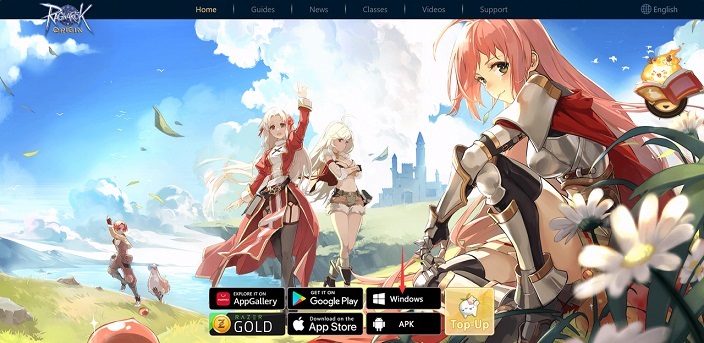
Step 1: To download Ragnarok Origin on PC, simply visit the official website and click on the Windows button. The download will start automatically.
Step 2: After the download is complete, open the installer and click on “Run Anyway” if prompted. Choose the installation location and click “Extract” to install the Launcher. It’s important to select a folder that contains only English characters to prevent errors.
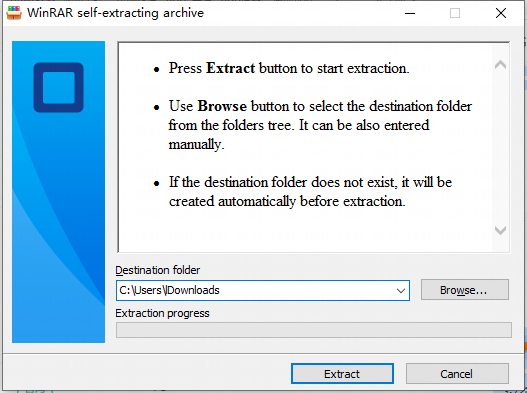
Note: If you forget the target folder path after the download is complete, you can search for “GameLauncher” to find the path.
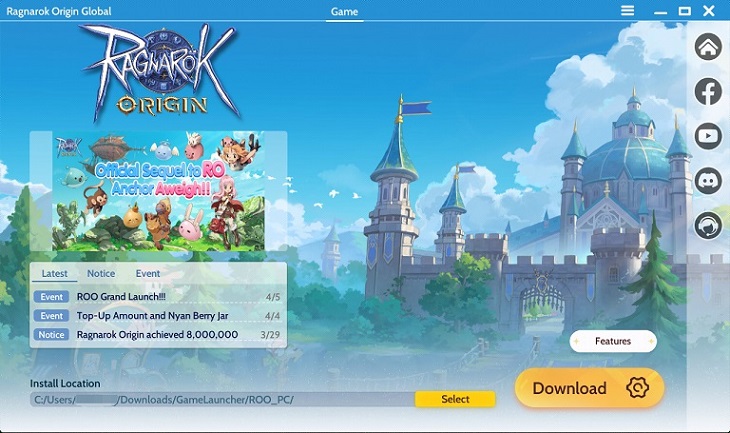
Step 3: Once the extraction process is complete, open the GameLauncher in the folder.
Step 4: If the launcher is not the latest version, click “Confirm” when prompted to update it.
Step 5: After the launcher is updated, choose the installation location for Ragnarok Origin and click “Start Download” to download the game. Make sure to select a folder path with only English characters to prevent errors. Once the download is complete, click the “Start” button to start playing.
Minimum System Requirements: Operating System: Windows 7 or later Memory: 8GB RAM Graphics Card: GTX1050 or above Storage: 10GB available drive space
PC Controls
Default Shortcuts:
ALT+ENTER: Switch between full-screen/windowed mode
W: Move Forward; A: Move Left; S: Move Backward; D: Move Right;
T: Team; C: Character; M: Mini-Map; B: Backpack;
1-6: Skills 1-6;
F1-F4: Item Slots 1-4;
F: Interact; Tab: Aim; E: Switch Skill Set;
K: Auto-battle;
U: Follow Party Leader/Cancel Follow;
Q: Switch control mode between Touch to Navigate and Visual Joystick;
SPACE: Skip Dialogues;
ENTER: Open Chatbox; Press again to send messages;
ESC: Close current interface or exit ROO;
By following these simple steps, you can download and start playing Ragnarok Origin on PC in no time. Join the adventure and experience the enchanted land of Ragnarok with better graphics and smoother gameplay.
[Related] Free Gift Codes for Ragnarok Origin